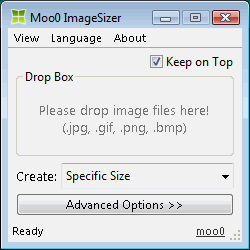 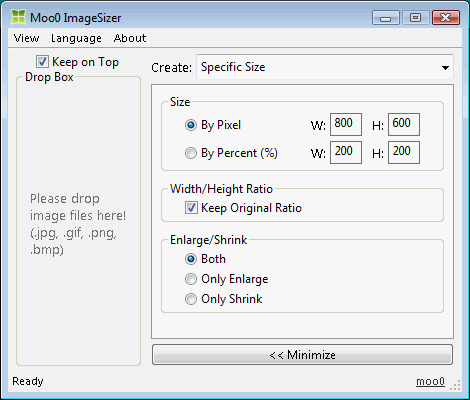
| Convert Image Sizes Easily Moo0 Image Resizer lets you easily convert images into different sizes. It is very easy to use, and you just need to drag and drop files onto the program window. This tool may be very powerful if you are working on designing and wondering about which sizes to choose from.
Norwegian support was made possible by Øistein. Thanks really a lot!! Spanish support was made possible by Descko. Thanks really a lot!! | ||||||||
| Page Title: | |||||||||
| Page URL: | |||||||||
| HTML Tag: | |||||||||
| Language: | Arabic, Belarusian, Brazilian Portuguese, Bulgarian, Chinese (Simplified), Chinese (Traditional), Croatian, Czech, Danish, Dutch, English, Estonian, Finnish, French, German, Greek, Hebrew, Hindi, Hungarian, Indonesian, Italian, Japanese, Korean, Norwegian, Persian, Polish, Portuguese, Romanian, Russian, Serbian (Cyrillic), Slovak, Slovenian, Spanish, Swedish, Thai, Turkish, Ukrainian, Vietnamese, 2 other languages (partial) - [ Translators (26) ] | ||||||||
| OS: | Windows XP/2003/Vista/7/8.1/10 | Ease of Use: | Very Easy | ||||||
| Version: | 1.24 | ||||||||
| Last Updated: | 2019/06/28 [ Update History (21) ] | ||||||||
| PAD File: | [ if you are running software listing site... ] | ||||||||
| Download: |
| ||||||||
| Size: | 3.59 MB | ||||||||
| License: | Free (Non-Commercial Use Only) Using at Workplace / Internet Cafe?
| ||||||||
| Feedback: | |||||||||
| FAQ: | ■ (Symptom) The program suddenly doesn't start up one day? stopped working properly? on Windows 10/8.1? This probably happens when "Windows SmartScreen" hinders our program from working. In this case, please try the following before the installation. 1. Before the installation, right-click on the installer file and open the file "Property". 2. At the bottom of "General" tab, if you see "Security: This file came from another computer...", select "Unblock" check box, and "Apply" and "OK". 3. If you install the program after it, it may be able to prevent many problems caused by "Windows SmartScreen" or some other security products. Or, you can actually turn off this problematic feature of Windows itself: (only if you feel too troublesome to do this every single time.) https://ugetfix.com/ask/how-to-disable-windows-smartscreen/ This happens to every software vendor who doesn't or can't donate $300 to Microsoft every single year (EV signature purchase), and especially when the program file is still new. This kind of problems started to get reported since the early of 2019. | ||||||||
