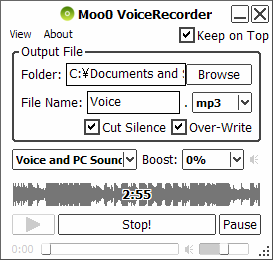
| Record Any PC Audio by 1-Click Moo0 Audio Recorder is a very simple sound recorder. It is very easy to use, and you can start recording "PC Audio" / "PC Audio and Voice" / "Only Voice" just by one-click. It supports MP3 and Wave file formats to save the files into.
Tips:
Greek (Revision) support was made possible by geogeo.gr at geogeo.gr. Thanks really a lot!! Update (2019/05/19): - Updated Mp3 encoding engine. - Equipped many counter-measures against "Sound Driver Errors". This will try to prevent the sudden errors, such that the recording speed suddenly goes wrong or so, because of their malfunctions. If this version still can't fix the problems, it usually can be fixed very easily only by re-installing the latest sound driver for your motherboard. - It now prevents the "skip" of the recorded audio when the PC is fully loaded or CPU ability is low. On the other hand, the graphical "graph display" of the recorded audio will be delayed from this version when the CPU is busy. - Some bug fixes on the installer. - Supported 6 more languages for the installer. (Spanish, Portuguese, Brazilian Portuguese, Polish, Indonesian, Vietnamese) - Supported 23 additional languages for the software, which are the followings. Arabic Indonesian Brazilian Portuguese Bulgarian Czech Serbian (Cyrillic) Danish Estonian Hebrew Hindi Spanish Croatian Dutch Norwegian Persian Polish Portuguese Slovak Slovenian Thai Finnish Turkish Vietnamese Turkish support was made possible by Adil KAHRAMAN. Thanks really a lot!! | ||||||||
| Page Title: | |||||||||
| Page URL: | |||||||||
| HTML Tag: | |||||||||
| Language: | Arabic, Belarusian, Brazilian Portuguese, Bulgarian, Chinese (Simplified), Chinese (Traditional), Croatian, Czech, Danish, Dutch, English, Estonian, Finnish, French, German, Greek, Hebrew, Hindi, Hungarian, Indonesian, Italian, Japanese, Korean, Norwegian, Persian, Polish, Portuguese, Romanian, Russian, Serbian (Cyrillic), Slovak, Slovenian, Spanish, Swedish, Thai, Turkish, Ukrainian, Vietnamese, 2 other languages (partial) - [ Translators (40) ] | ||||||||
| OS: | Windows XP/Vista/7/8.1/10 | Ease of Use: | Very Easy | ||||||
| Version: | 1.49 | ||||||||
| Last Updated: | 2019/06/29 [ Update History (47) ] | ||||||||
| PAD File: | [ if you are running software listing site... ] | ||||||||
| Download: |
| ||||||||
| Size: | 4.06 MB | ||||||||
| License: | Free (Non-Commercial Use Only) Using at Workplace / Internet Cafe?
| ||||||||
| Feedback: | |||||||||
| FAQ: | ■ (Symptom) Volume Adjustment? You can adjust the recording volume from "Boost" menu. ■ (Symptom) The program suddenly doesn't start up one day? stopped working properly? on Windows 10/8.1? This probably happens when "Windows SmartScreen" hinders our program from working. In this case, please try the following before the installation. 1. Before the installation, right-click on the installer file and open the file "Property". 2. At the bottom of "General" tab, if you see "Security: This file came from another computer...", select "Unblock" check box, and "Apply" and "OK". 3. If you install the program after it, it may be able to prevent many problems caused by "Windows SmartScreen" or some other security products. Or, you can actually turn off this problematic feature of Windows itself: (only if you feel too troublesome to do this every single time.) https://ugetfix.com/ask/how-to-disable-windows-smartscreen/ This happens to every software vendor who doesn't or can't donate $300 to Microsoft every single year (EV signature purchase), and especially when the program file is still new. This kind of problems started to get reported since the early of 2019. ■ (Symptom) Recording speed is wrong? or suddenly became wrong one day?, when recording "Any PC Sound" on Vista/7/8.1/10? This happens because some sound drivers keep failing in reporting correct playback frequencies. You can usually and easily fix this issue by updating or reinstalling your sound driver. Or, you can also manually fix the recording speed through "Setting" -> "Recording Speed Adjustment" menu. Otherwise, you may try the following. Open "Sound Control Panel": ■ Windows 10: https://www.isunshare.com/windows-10/3-ways-to-open-sounds-settings-in-windows-10.html ■ Windows 7: https://oxen.tech/blog/using-sounds-settings-control-panel/ Inside "Playback" tab, right-click on the "Default Device" and open "Property". Inside the "Advanced" tab, change the "Default Format" to "16 bit 48,000Hz" or "16 bit 44,100Hz". After it, restart the software, or choose the same frequency from "Setting" -> "Recording Speed Adjustment" menu. ■ (Symptom) Not working on "RealTek High Definition Audio"? It seems "Stereo Mixer Devices", which are often required to record any PC sounds, have often been hidden/disabled on this sound chips by default. Some people successfully fixed this issue using the latest drivers. - It may not work for all the PCs though. RealTek High Definition Audio Drivers Some people say you should install the driver twice to make it work on Windows 7/8. Install it first, and then re-install it after rebooting the PC. ■ (Symptom) Only "Only Voice" option is available on Windows XP. / Some functions are not working. We first recommend you to update your sound card driver (audio driver). In most cases, it can fix the problem. Still not working? Then, it may be because your sound card is "Realtek HD Audio". If so, please read the next FAQ section. Otherwise, we may be able to fix it easily. Please generate an error report file through "About -> Generate Error Report File.." and send it to us. We'll see what we can do to fix the problem. ■ (Symptom) "Realtek HD Audio" Sound Card on Windows XP This is tougher one to support. We are working on it. Follow-Ups) In order for Windows XP to record PC sound, one of the following controls has to be found on the sound card: "Stereo Mix", "Stereo Out", "Wave Out Mix", "Wave Out", "What U Hear", "WAVE 出力ミックス", "ステレオ ミキサー", "再生リダイレクト", "モノラル ミキサー", "Mono Mix" However, on "Realtek HD Audio", these controls are disabled initially, and they can't be enabled easily by other programs. This is why our program usually shows only "Only Voice" option on this card. Many people are suffering from this, and you may find some solutions from Google Search Results for "Realtek HD Audio Stereo Mix". Follow-Ups) Some people successfully fixed this issue using the latest drivers. - It may not work for all the PCs though. RealTek High Definition Audio Drivers Some people say you should install the driver twice to make it work on Windows 7/8. Install it first, and then re-install it after rebooting the PC. | ||||||||
| Reviews: |
Japanese) 「Moo0 音声録音機」 - 開始/終了タイマーを設定してPC音やマイク音を録音できるソフト (フリーソフト100) Easy Sound, Voice Recorder For Windows (ghacks.net) - Aug 01, 2011 | ||||||||
